Disk speed test for iPhone and iPad
Know if your drive can hold your bitrate
Will this drive actually keep up? DiskDyno measures how fast a drive really reads and writes from your iPhone or iPad, and grades how much you can trust each number.
Coming to the App Store
$2.99, once. Everything included, no in-app purchases, no subscription. No account, and nothing leaves your device.
Who DiskDyno is for
- Shooting video on an iPhone or iPad
- Offloading cards in the field
- Sizing up a drive or hub you do not trust yet
- Working out why a copy is mysteriously slow
The number grades itself
Most speed tests hand you one number and ask you to believe it
The most common way that number goes wrong is invisible: the system serves the read out of memory instead of off the drive, and a slow drive looks fast.
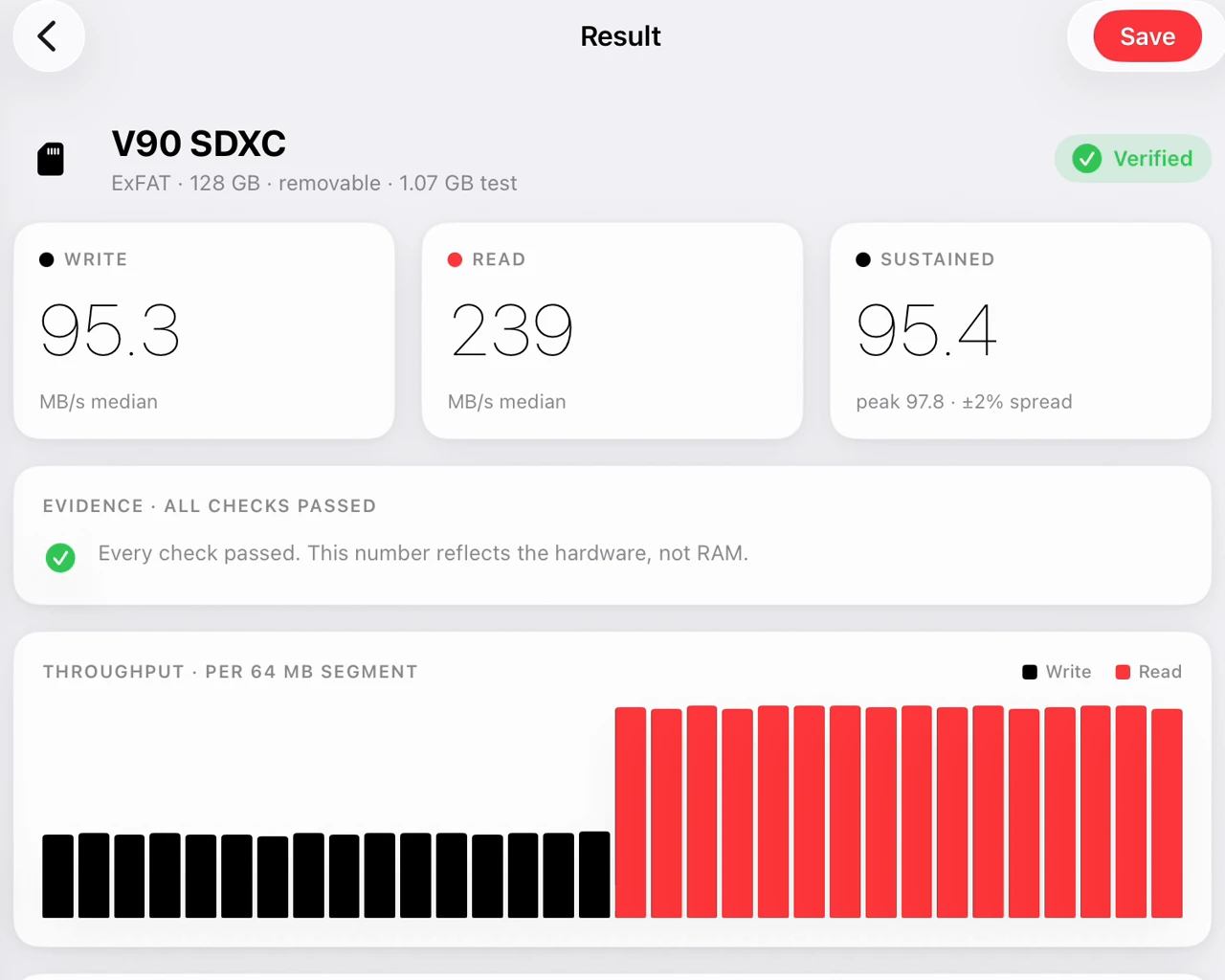
DiskDyno bypasses the read cache (cache defeat) on every test. Then it runs a second, separate test whose only job is to prove that the bypass actually reached the device. Every run is graded, and the reason is named.
-
Verified
Nothing was found wrong with the run.
-
2 caveats
Something was found that you should know about but that does not invalidate the number. The badge counts them.
-
Suspect
Something was found that probably does invalidate it.
The worst finding sets the verdict, and every finding is named: the cache was not defeated; repeated runs disagreed with each other; the speed came in above what the port can physically carry; the charger could not power the device and the drive at once.
The confidence verdict appears on every result.
Burst is not sustained
A drive is fast for the first few seconds, and then it is not
That is why a card that tested fine can still drop frames on a long take.
DiskDyno discards the opening burst and reports sustained speed as its own number. When the two diverge sharply, it says so and tells you why.
The short test shows you the drive's opening burst. The longer tests show you what it does after the drive's own write cache fills, which is the number that matters when the record light is on.

Test the drive you actually plugged in
External SSDs, card readers, thumb drives, drives behind a hub, and your internal storage
DiskDyno never scans your volumes. You point it at a drive through the standard iOS picker and it tests that location and nothing else. That is also why it reaches drives that volume-scanning apps miss.

Will it hold your format
Checked against 120 combinations of codec, resolution and frame rate
DiskDyno compares your measured sustained speed against six codecs, from ProRes 422 HQ and DNxHR HQ down to H.264 and H.265, at four resolutions and five frame rates, and tells you which of the 120 combinations the drive can carry.

Find the slow link
Which part of the chain is actually the bottleneck
Copy between two external drives and DiskDyno times the real transfer, reading and writing at once the way a real copy does. Then it names the likely bottleneck: the source drive, the destination drive, the hub's uplink, or your device's port.
Swapping cables at random is not a diagnostic.
Keep a record
Label your runs, compare your drives, file the evidence
Sort and compare your drives side by side, and export any result as a one-page PDF you can share or file. Export is never restricted.

Where it runs
-
iPhone
The full test, the full confidence system, and the codec matrix.
-
iPad
A split-view layout built for the larger screen, with the sidebar and the comparison list side by side.
-
Mac, via Designed for iPad
The same app on an Apple silicon Mac.
-
Requires iOS 17 or later
The requirements and the limits are set out in full below.
Nothing leaves your device
No account, no analytics, no cloud sync
DiskDyno has no networking code. Your saved results are a file on your device, and the app holds no code that could send them anywhere.
No account, no sign-in, no analytics, no tracking, no cloud sync.
What it does not do, and what it needs
| Counterfeit drives | DiskDyno measures speed, not capacity. If a drive is slower than it should be, that shows up. If a drive lies about how big it is, DiskDyno will not catch it. |
|---|---|
| A measurement is not a spec | A result is evidence about your drive, your cable and your port at the moment you ran it. It is not a promise about what that drive will do next time. |
| Format guidance | An estimate, compared against published data rates. It does not know your camera or your recording settings. Test your own workflow before you rely on it. |
| External drives | You select a folder through the iOS picker. DiskDyno never scans or enumerates your volumes, so it cannot show you a drive you have not handed it. |
| Free space | A test needs free space at least equal to the test size you chose, plus a margin, on each drive involved. DiskDyno checks before it starts and refuses if there is not room. |
| Requirements | iOS 17 or later. iPhone and iPad. English only at launch. |
Test the card before the shoot, not after
Coming to the App Store
$2.99, once. Everything included, no in-app purchases, no subscription.
Still deciding? The support page answers the questions people actually ask, starting with why you should believe this app's accuracy claim over anyone else's.